
Email remains one of the highest-performing digital marketing channels, and with the right setup, it compounds over time. Here is how to get the most out of TouchBasePro in seven practical steps.
1. Build and Segment Your Email List
A quality list is the foundation of every successful email campaign. Collect addresses through sign-up forms on your website, social media profiles, and at events. Once you have subscribers, segment them by demographics, behaviour, and preferences. TouchBasePro makes it straightforward to create and manage those segments so each message stays relevant to the people receiving it.
2. Craft Compelling Content
Your emails need to earn attention fast. Write subject lines that give subscribers a reason to open, use personalised greetings, and make sure the body content delivers genuine value. TouchBasePro's drag-and-drop editor lets you build visually polished emails without touching a line of code, so your design team and your marketing team can work in the same tool.
3. Design Mobile-Friendly Emails
More than half of all emails are opened on a phone. TouchBasePro's responsive templates adjust automatically to different screen sizes, so your layout does not break on smaller devices. Still, test your emails across a few devices before sending. What looks clean on desktop can fall apart on a 5-inch screen.
4. Automate Your Campaigns
Manual sending does not scale. TouchBasePro's automation lets you build welcome sequences, drip campaigns, and behaviour-triggered messages that go out at the right moment without anyone pressing send each time. This keeps leads moving through your funnel and frees your team to focus on strategy rather than scheduling.
5. Analyse and Optimise Performance
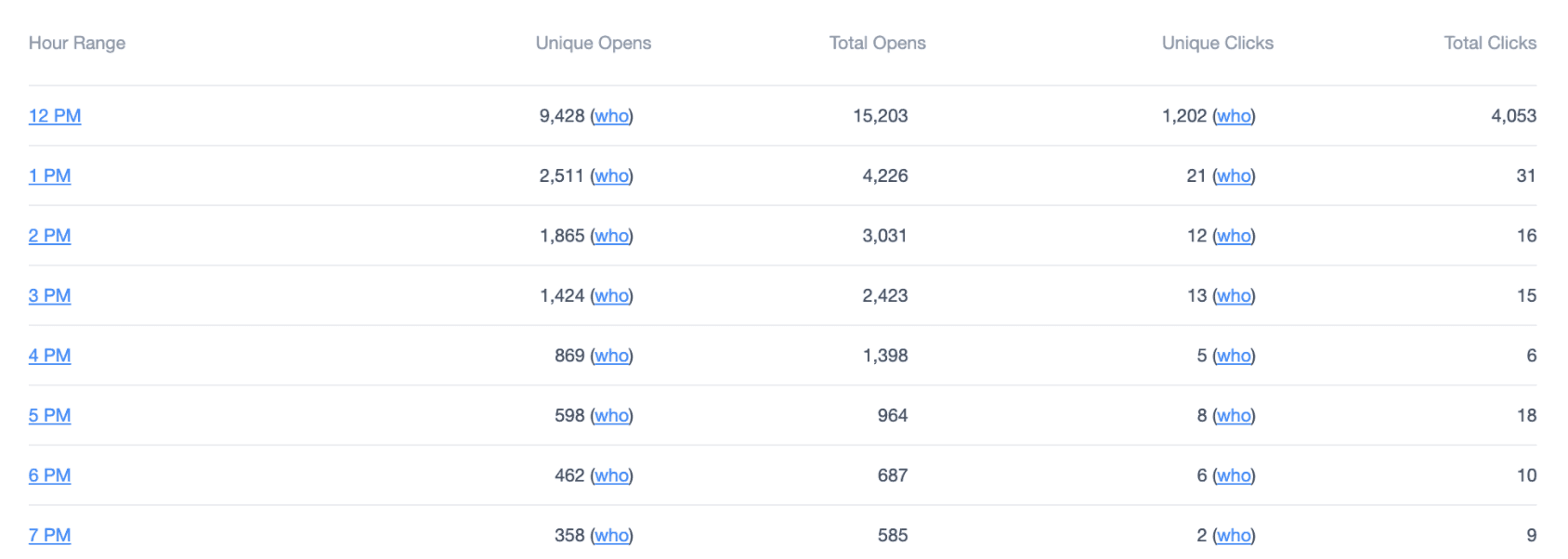
You cannot improve what you do not measure. TouchBasePro's reporting tools track open rates, click-through rates, conversions, and more. Review those numbers after every campaign and use A/B testing to work out which subject lines, send times, and content formats perform best with your audience.
6. Ensure Compliance with Email Regulations
Sending to people who have not given permission is not just bad practice in South Africa, it puts you in breach of POPIA. TouchBasePro supports double opt-in forms and one-click unsubscribe options to keep your list clean and your sending practices compliant. GDPR obligations apply if any of your subscribers are based in the EU. Build compliance in from the start rather than retrofitting it later.
7. Integrate with Other Tools
TouchBasePro connects with your CRM, e-commerce platform, and other tools in your marketing stack. Those integrations mean subscriber data stays consistent across systems, your campaigns can respond to real purchase and browsing behaviour, and you spend less time manually syncing records between platforms.
Following these seven steps will not turn a weak strategy into a strong one overnight, but they will remove the common technical and operational blockers that hold most email programmes back. Get your list right, automate the repetitive work, stay compliant, and let the data tell you what to improve next.
Book a demo to see how TouchBasePro fits into your existing marketing setup.
Frequently asked questions
- Does TouchBasePro support POPIA compliance for email marketing?
- Yes. TouchBasePro includes double opt-in forms and easy unsubscribe options to help South African businesses meet their POPIA obligations. If you also send to subscribers in the EU, the same features support GDPR compliance.
- Can I automate email campaigns in TouchBasePro without coding skills?
- Yes. TouchBasePro's automation tools let you set up welcome sequences, drip campaigns, and behaviour-triggered emails through a visual interface. No coding is required.
- How does TouchBasePro handle email list segmentation?
- TouchBasePro lets you create segments based on subscriber demographics, behaviour, and preferences. You can manage multiple segments within the platform and target each one with tailored content.
- What reporting metrics does TouchBasePro track for email campaigns?
- TouchBasePro tracks open rates, click-through rates, conversions, and other key metrics. Its reporting tools also support A/B testing so you can compare performance across different subject lines, content formats, and send times.