How to Manage Your Suppression List in TouchBasePro
Understand how your TouchBasePro suppression list works, how subscribers are added to it, and how to remove an address when you have clear consent to do so.
What is a suppression list?
A suppression list is unique to each account and is a list of email addresses that you do not want to contact. Your suppression list is in place to help protect your sending reputation and ensure you don't contact anyone you shouldn't by mistake. Subscribers are added both automatically and manually to your suppression list.
How are subscribers automatically added to the suppression list?
There are three ways that will cause a subscriber to be automatically added to your suppression list:
- They click unsubscribe within one of your email campaigns and you have global unsubscribes turned on.
- Their email address hard bounces.
- The subscriber marks one of your emails as spam (unless they are on Gmail).
How do you manually add subscribers to the suppression list?
There are two ways in which you can add subscribers to your suppression list:
- You can navigate to suppressions within your lists & subscribers and from there you can add to your suppression list. This lets you add subscribers in bulk to the suppression list.
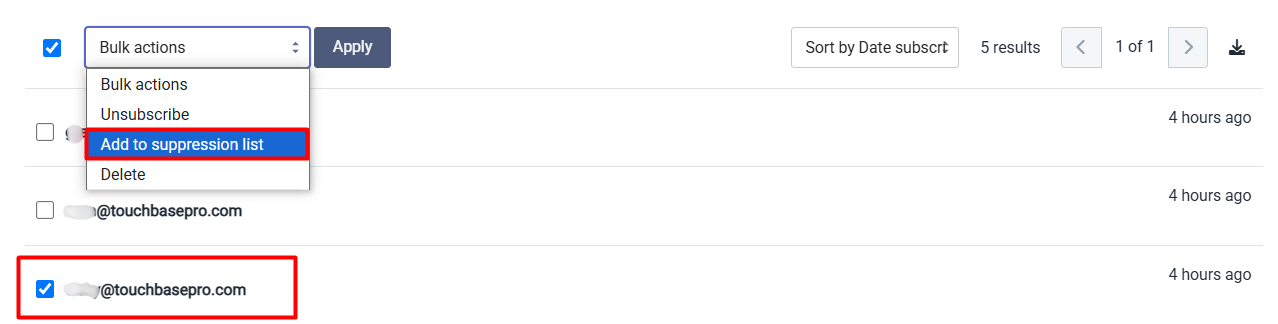
- You can change a subscriber's status and add them to the suppression list from within a list
How to remove someone from the suppression list
We only recommend removing someone from your suppression list if you have clear consent from a subscriber that they want to receive content from you. To protect your sending reputation and avoid errors you cannot bulk remove subscribers from the suppression list.
If you want to remove someone from your suppression list follow these steps:
- Navigate to your suppression list which can be found under lists and subscribers
- Search for the email address you want to remove
- Click the three dots next to the email address and click unsuppress

If you need any assistance with your suppression list please contact support@touchbasepro.com
Frequently asked questions
- What automatically adds a subscriber to my suppression list?
- There are three ways a subscriber is added automatically: they click unsubscribe in one of your email campaigns and you have global unsubscribes turned on; their email address hard bounces; or they mark one of your emails as spam (unless they are on Gmail).
- How do I manually add subscribers to my suppression list?
- You can navigate to Suppressions within your Lists and Subscribers section to add subscribers in bulk, or you can change an individual subscriber's status from within a list to add them to the suppression list.
- How do I remove someone from my suppression list?
- Navigate to your suppression list under Lists and Subscribers, search for the email address you want to remove, then click the three dots next to the address and click Unsuppress. TouchBasePro recommends only doing this when you have clear consent from the subscriber.
- Can I bulk-remove subscribers from my suppression list?
- No. To protect your sending reputation and avoid errors, bulk removal from the suppression list is not supported.