How to Merge Subscriber Lists in TouchBasePro
TouchBasePro has no built-in list merge function, but you can combine lists manually by exporting and importing subscribers between lists.
Merge subscriber lists
While there is no built-in function to combine subscriber lists in your account, you can merge them manually by following the below steps.
- Navigate to your lists & subscribers.
- Find the list you want to export and merge, select the three dots next to the list name and download it

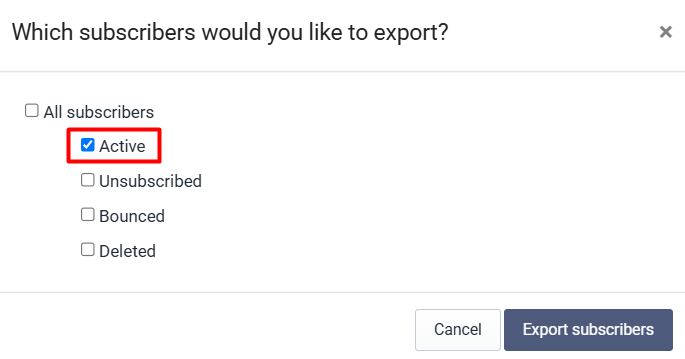
- Select which subscribers you'd like to export. For merging lists, you will export your active subscribers. However, if you have changed your unsubscribe settings to unsubscribe from a list only, you will need to export your unsubscribed subscribers too and add them to your suppression list.
- You can now navigate to the list that you want to add data to and select import or update. You can then upload the list you just downloaded and match the custom fields.
You can follow these steps for each list that you want to merge.
Things to be aware of when merging lists
- When merging lists, no duplicates will be added to your database. The system will only update custom field data if a subscriber already exists on a list.
- Be aware of your custom field data. Remember that the system will always take your latest data and override custom field data with the newest information.
- Match your custom field data correctly. You may have the same custom field labelled differently across lists so be sure to know exactly what data is in your lists.
If you need assistance with merging lists, please contact our support team on support@touchbasepro.com
Frequently asked questions
- Does TouchBasePro have a built-in function to merge subscriber lists?
- No. There is no built-in function to combine subscriber lists in your account. You can merge them manually by exporting subscribers from one list and importing them into another.
- Will merging lists create duplicate subscribers?
- No. When merging lists, no duplicates will be added to your database. The system will only update custom field data if a subscriber already exists on a list.
- What happens to custom field data when I merge lists?
- The system will always take your latest data and override existing custom field data with the newest information. Make sure to match your custom fields correctly, as the same field may be labelled differently across lists.
- Do I need to export unsubscribed contacts when merging lists?
- If you have changed your unsubscribe settings to unsubscribe from a list only, you will need to export your unsubscribed subscribers and add them to your suppression list.