How to Add and Customise Buttons in the Email Builder
Add and customise button blocks in the TouchBasePro email builder to create effective calls-to-action, track clicks, and use AI-powered Smart Buttons for wording suggestions.
When using the template builder, you can drag and drop a "Button" block into your design, then customise the buttons size, colour, style, alignment and link. Buttons are great to use as a call-to-action.
Add and customise buttons
To customize a button:
- Drag and drop the "Button" content block from the "Build" menu on the right into a section column.
- In the right sidebar, select your customisation options, including size, style, corner type, alignment, font and color.
- Add a URL to the "Button link" input field. You can use different link types such as "open website", "Image Link", "Email" or "Whatsapp Link"
Smart buttons
You can use our "Smart Buttons" and get AI-based suggestions for your buttons based on the tone you want. This can help you brainstorm different types of wording you can use on your buttons to drive action instead of using the standard "Click here"
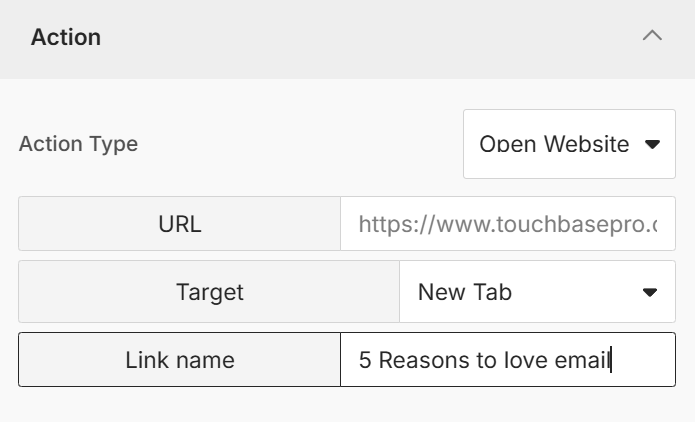
Link name
All links within your campaign allow you to add a link name to them. This helps you better track exactly which links were clicked on. For example, if you have a hyperlink and a button both directing to the same link, you can use the link name to differentiate which one got the most clicks.
If you need assistance with buttons or our template builder please contact us on support@touchbasepro.com
Frequently asked questions
- How do I add a button to my email template?
- Drag and drop the 'Button' content block from the 'Build' menu on the right into a section column. You can then customise its size, style, corner type, alignment, font, and colour in the right sidebar.
- What link types can I use on a button?
- You can add a URL to the 'Button link' input field and choose from link types such as 'open website', 'Image Link', 'Email', or 'Whatsapp Link'.
- What are Smart Buttons?
- Smart Buttons provide AI-based suggestions for your button wording based on the tone you select. They help you brainstorm alternatives to standard phrases like 'Click here' to better drive action.
- What is a link name and why should I use one?
- A link name lets you label individual links within your campaign so you can track exactly which ones were clicked. For example, if a hyperlink and a button both point to the same URL, a link name lets you tell them apart in your click reports.