Open Rates Are Lying to You: What to Measure Instead
Your open rate looks great. Shame it’s fiction. Apple Mail Privacy Protection, image blocking and security bots all distort opens. This guide shows what open rates are still good for, which metrics to track instead, from clicks to revenue per email, how to redefine an engaged subscriber without relying on opens, and the one-page monthly report your boss actually wants.

Your last campaign hit a 52% open rate. Champagne? Not yet.
A big chunk of those "opens" never involved a human reading your email. Apple's privacy features, image blocking and security bots all register opens that didn't happen, or hide opens that did.
The open rate still sits at the top of most email reports. It's quick to read and easy to compare. But it's also the least reliable number on the page.
This guide shows you:
- Why open rates stopped telling the truth
- What they're still useful for
- The email marketing metrics that actually show performance, from clicks to revenue
- How to redefine an "engaged subscriber" without relying on opens
- A simple monthly report your boss will understand
Why the open rate broke
An "open" is a tiny invisible image (a tracking pixel) in your email. When the image loads, your platform counts an open. Three things now mess with that image.
1. Apple Mail Privacy Protection
Since iOS 15 in 2021, Apple Mail users can switch on Mail Privacy Protection (MPP). Apple then downloads every email's images in the background, often before the person looks at the email. Your platform sees an open either way.
The scale is big. Litmus tracked over 1.5 billion opens in September 2026. Apple Mail, including privacy-protected opens, made up about 77% of them. Litmus estimates MPP affects roughly 55% to 60% of all opens it tracks.
South African audiences use more Android phones than the global average, so your Apple share may be lower. Check the email client report in your platform before you assume either way.
2. Image blocking
Some email clients, especially desktop Outlook in corporate settings, block images by default. A person can read your whole email, click nothing and never register an open. Your open rate undercounts these readers.
3. Security bots
Corporate email security tools scan incoming email for threats. Many load the images and even click every link to check them. That creates fake opens and fake clicks, often within seconds of delivery. B2B senders feel this most.
The result
Open rates now overcount some people and undercount others. They can rise while real engagement falls. Make decisions on them alone, and you'll reward the wrong subject lines, keep the wrong subscribers and report numbers that don't match sales.
At a glance: the email metrics ladder
Every email metric sits on a ladder. The higher the rung, the harder it is for a bot or a privacy feature to fake, and the closer it gets to money.
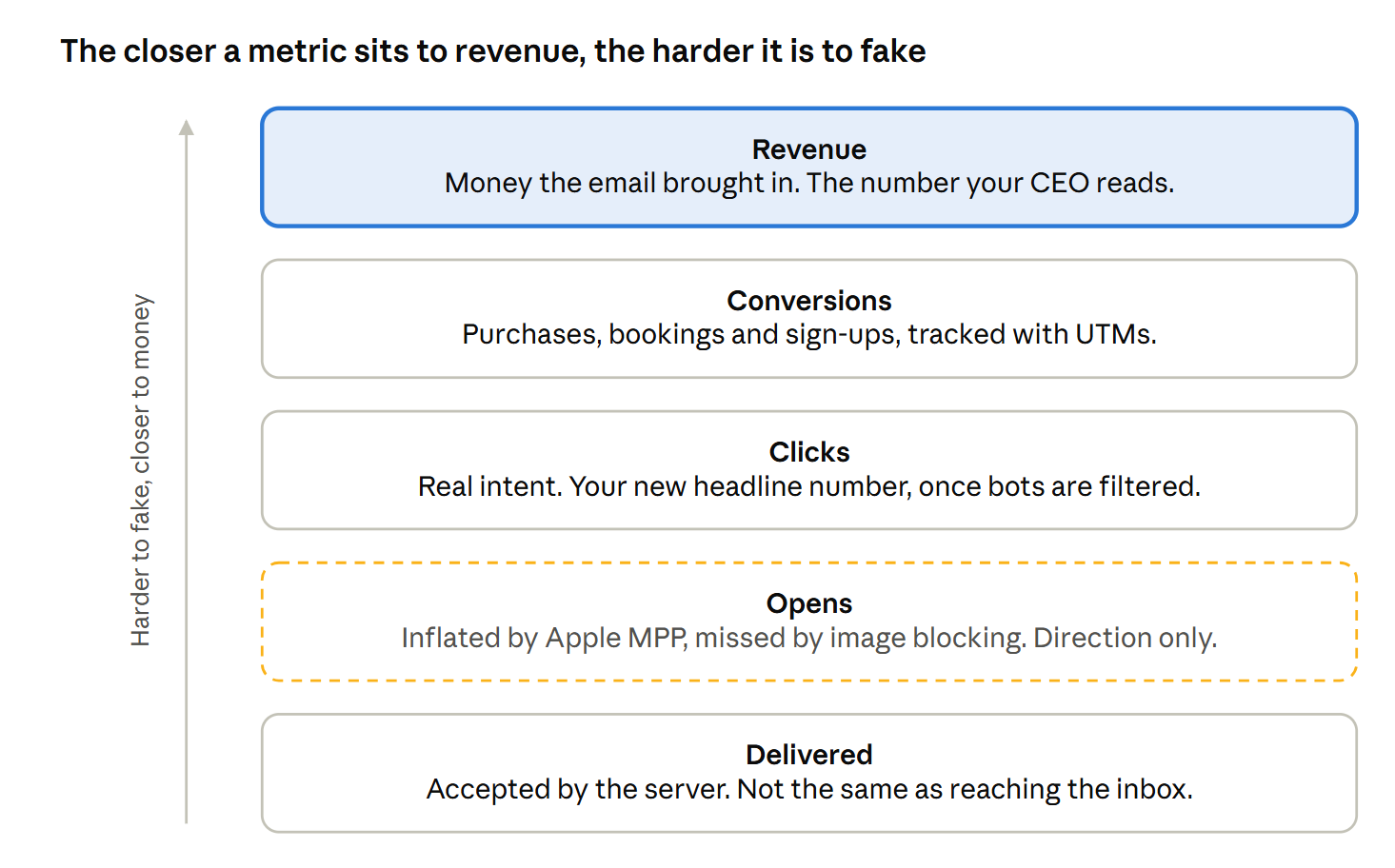
Most reports stop at opens, on the weakest rung. The rest of this guide moves you up the ladder.
What open rates are still good for
Don't bin the open rate. Demote it. It still works as a rough signal if you use it the right way.
- Spotting deliverability trouble. A sudden drop in opens at one provider, say Gmail, often means your emails started landing in spam there. The trend matters more than the number.
- Comparing like with like. Your open rate this month against last month, for the same list and the same type of email, still shows direction.
- Subject line tests, with care. Exclude Apple MPP opens if your platform lets you, or judge the test on clicks instead.
- A first-pass filter. Someone who has registered zero opens and zero clicks for a year is almost certainly gone.
What open rates are bad for:
- Comparing yourself against industry benchmarks
- Proving a campaign made money
- Deciding who counts as an "engaged" subscriber on their own
- Bonuses and targets for your team
Clicks: your new headline number
A click takes effort. Someone saw something they wanted and acted on it. That makes clicks far more honest than opens, as long as you measure them properly.
Click-through rate (CTR)
Unique clicks divided by emails delivered.
CTR = unique clicks ÷ delivered × 100
This is your best single measure of whether an email worked. Make it the headline number in your reports instead of the open rate.
Click-to-open rate (CTOR)
Unique clicks divided by unique opens. It used to show how good your content was once someone opened.
The catch: inflated opens make CTOR look worse than it is. Use it to compare emails sent to the same list, never as a stand-alone score.
Filter out bot clicks
Security bots that click every link can make a dull email look brilliant. Watch for:
- Clicks within a few seconds of delivery
- One contact clicking every link in the email, including the unsubscribe link and footer links
- Big click spikes from one company domain
Ask your email platform whether it filters bot clicks, and whether you can turn that on. Some marketers add a hidden link that no human can see. Anyone who "clicks" it is a bot, so you can exclude their activity.
Look at what people clicked
Total clicks tell you whether an email worked. Click maps tell you why. Check which links, products and buttons pulled the most clicks, then build the next email around them.
Conversions and revenue: the numbers that pay the bills
Your CEO doesn't care how many people opened the newsletter. They care what it brought in. Conversion and revenue metrics answer that.
Tag every link with UTMs
UTM parameters are short tags on the end of your links. They tell Google Analytics (or your own analytics tool) that a visitor came from a specific email.
?utm_source=touchbasepro&utm_medium=email&utm_campaign=bf-teaser-nov26
Most email platforms can add them automatically. Switch it on and keep the naming consistent, or your reports turn into a mess.
The metrics to track
| Metric | How to calculate it | What it tells you |
|---|---|---|
| Conversion rate | Conversions ÷ delivered × 100 | How many recipients did the thing you wanted: bought, booked, signed up |
| Revenue per email | Revenue from the email ÷ delivered | What each email sent is worth, so you can compare campaigns of different sizes |
| Revenue per subscriber | Email revenue for the month ÷ active subscribers | What your list is worth, and whether it's growing in value |
| Cost per conversion | Campaign cost ÷ conversions | Whether email pays for itself compared with your other channels |
A conversion doesn't have to be a sale. For a B2B brand, it might be a demo request. For an insurer, it might be a quote. Pick the action that matters and track it the same way every time.
Remember the quiet converters
Some people read your email, close it and buy later on another device. Email gets no credit in a last-click report. Look at assisted conversions in your analytics tool, and compare sales from subscribers against non-subscribers to see the bigger picture.
List health and deliverability: the early warning system
Clicks and revenue tell you how a campaign did. These metrics tell you whether the next one will even arrive.
| Metric | How to calculate it | Watch for |
|---|---|---|
| Delivery rate | Delivered ÷ sent × 100 | A drop means bounces or blocks are rising |
| Hard bounce rate | Hard bounces ÷ sent × 100 | Anything over 2% points to an old or bought list |
| Spam complaint rate | Complaints ÷ delivered × 100 | Gmail and Yahoo want it under 0.3%, ideally 0.1% |
| Unsubscribe rate | Unsubscribes ÷ delivered × 100 | A spike after one email shows a content or frequency problem |
| List growth rate | (New subscribers − unsubscribes, bounces and complaints) ÷ list size × 100, per month | A shrinking list means you're losing people faster than you find them |
| Gmail spam rate | Shown in Google Postmaster Tools | A rising trend, even below 0.3% |
Unsubscribes aren't the enemy
An unsubscribe is a polite goodbye. A spam complaint is a slammed door that damages your reputation. If unsubscribes rise but complaints stay low, people are using the exit you gave them. That's healthy.
Check inbox placement, not just delivery
"Delivered" only means the receiving server accepted the email. It doesn't mean it reached the inbox. Use Google Postmaster Tools for Gmail, and seed-list testing tools to check whether your emails land in the inbox, the Promotions tab or spam.
Redefine your "engaged subscriber"
Most lists still sort people by opens. "Opened in the last 90 days" sounds sensible, until you realise Apple MPP marks almost every Apple Mail user as engaged forever.
That breaks two things:
- Segmentation. You send your best offers to people who never read them.
- Sunset policies. You never remove inactive Apple users, because they always look active. They drag down engagement and your sender reputation with it.
Build engagement on stronger signals
Count someone as engaged when they did something an MPP proxy can't fake:
- Clicked a link
- Bought something or converted
- Replied to an email
- Visited your website or app while logged in or identified
- Opened on a client that isn't privacy-protected, as a weaker supporting signal
A simple tier model
| Tier | Definition | What to send |
|---|---|---|
| Active | Clicked, bought or replied in the last 90 days | Your full programme |
| Cooling | Last click or purchase 91 to 180 days ago | Your best content only, at lower frequency |
| At risk | Opens only (likely MPP), no click or purchase in 180 days | A re-engagement series that asks for a click |
| Lapsed | No click, purchase or reply in 12 months, and no response to re-engagement | Remove or suppress |
Adjust the windows to your buying cycle. A grocery retailer might use 30 days. A car dealer or insurer might use a year. The principle stays the same: judge engagement on actions, not on pixels.
The report your boss actually wants
Leadership wants three answers: did email make money, are people still interested, and is anything about to break? Build your monthly report around those three questions and keep it to one page.
| Question | Metric | Why it earns its spot |
|---|---|---|
| Did it make money? | Email revenue (or conversions) | The number everyone understands |
| Did it make money? | Revenue per email delivered | Fair comparison across campaigns of any size |
| Are people interested? | Click-through rate | The most honest engagement signal |
| Are people interested? | Active subscribers (clicked or bought in 90 days) | Shows whether your real audience is growing |
| Is anything about to break? | Spam complaint rate | The fastest route to the spam folder |
| Is anything about to break? | Hard bounce rate | Flags old or poor-quality data |
| Is anything about to break? | List growth rate | Shows whether you're replacing the people you lose |
Put the open rate at the bottom, labelled as a directional signal, or leave it out altogether. If someone asks where it went, send them this article.
Three habits that make reports useful
- Show trends, not snapshots. Compare each number with last month and the same month last year.
- Add one line of meaning per number. "CTR fell 0.4 points because we sent the same offer twice" beats a chart with no story.
- End with one action. Every report should change what you send next month.
Stop celebrating pixels
The open rate made email reporting easy. It also made it lazy. Swap it for clicks, conversions, revenue and list health, and your reports start matching what actually happens in your business.
Want help building reports that show what your email programme really earns? Talk to TouchBasePro. We'll help you track the numbers that matter.