How to Clean Your Email Database and Improve Results
Bad data kills good campaigns. Greg Phillips walks through three practical fixes: validating what you have, tightening how you capture new data, and enriching your list so you can actually segment it.
So your team has never really been capturing email addresses properly, or the person doing data entry was a temp who typed half the addresses wrong and nobody checked.
You are not alone. We hear this in almost every new client meeting.
There is something you can do about it. Let's split the problem into parts and work through each one.
The first split is past versus future.
The past
Can you do anything about old, bad data? Sometimes, yes.
If you have hard copies of the original opt-ins, you could re-capture the data. But think about how much time has passed since those people last heard from you. The cost of that exercise usually outweighs the return. Unless there is a strong business case, the past is best left alone.
That said, the data you already have on file is worth looking at.
List validation
TouchBasePro runs a list validation service that checks each email address against a set of factors and returns a full set of metrics. Here is what we check:
Verification result:
- deliverable
- undeliverable
- risky
- unknown
Reason codes:
invalid_email, the address fails basic syntax checksinvalid_domain, the domain does not existrejected_email, the SMTP server rejected the address outrightaccepted_email, the SMTP server accepted the addresslow_quality, the address has quality issues that make it risky or low-valuelow_deliverability, looks deliverable but cannot be guaranteedno_connect, could not reach the SMTP servertimeout, the SMTP session timed outinvalid_smtp, the server returned an unexpected responseunavailable_smtp, the server was unavailableunexpected_error, something else went wrong
Additional flags:
roletrue | false, flags role addresses like postmaster@ or support@freetrue | false, flags free providers like gmail.com or yahoo.comdisposabletrue | false, flags throwaway domains like mailinator.comaccept_alltrue | false, the domain accepts all mail, so delivery cannot be confirmeddid_you_meannull | string, suggests a correction for common typos (lindiwe7@gamil.com becomes lindiwe7@gmail.com)qualityfloat, a score from 0 (no quality) to 1 (perfect quality)emailstring, returns a normalised address (BoB@example.com becomes bob@example.com)userstring, the local part of the address (bob@example.com returns bob)domainstring, the domain portion (bob@example.com returns example.com)successtrue | false, confirms the API request completed without errors
Once we have these results, we remove addresses that no longer work and fix the spelling errors. The quality scores let you filter the list further so you are only sending to the best addresses.
Quality score thresholds
For transactional email:
| Score | Rating |
|---|---|
| 1.00, 0.55 | Good |
| 0.54, 0.20 | Fair |
| 0.19, 0.00 | Poor |
For marketing email:
| Score | Rating |
|---|---|
| 1.00, 0.70 | Good |
| 0.69, 0.40 | Fair |
| 0.39, 0.00 | Poor |
After validation, you have a far higher level of confidence that the people on your list actually exist.
The future
Now look at what you are going to change about how you capture data from this point on.
Opt-in opportunities
Check each of these touchpoints in your business and ask whether you are capturing an email address and permission at each one:
- Website opt-in forms
- Website registrations
- Customer walk-ins (are staff asking for an email address?)
- Wi-Fi access (ask for an email and permission to contact)
- Booking forms, online and offline
- Application forms, manual and online
- Marketing leads from conversion pages and lead ads
- Opt-in apps on tablets at expos or events
How you implement changes at each point will vary by business. There is no single approach that suits everyone.
Data enrichment
The third piece is the richness of your data. How much do you actually know about the people on your list?
TouchBasePro offers a data enrichment service that pulls publicly available information about a person based on their email address. The process is straightforward:
- Upload your customer list to our system.
- Tell your account manager you want the list enriched.
- We configure the enrichment on our side and process each address.
- You receive an enriched list you can segment by topic and interest.
Here is the enrichment report pulled from a single address, greg@touchbasepro.com:

Greg Phillips, email data enrichment example
One contact is interesting. At scale, it becomes a proper segmentation tool.
Why this matters for ROI
Email marketing carries a 44:1 ROI ratio. The key detail in that number is that 77% of it comes from automated and targeted communication. Enrichment is what makes that targeting possible.
Here is a look at the types of data enrichment can surface:

Top-level topics include broad categories like Art, Business, or Hobbies. Here is a partial list:
- Travel destinations
- News
- Books and publications
- Television and film
- Popular culture
- Business and careers
- Government and politics
- Hobbies and interests
- Sports
- Technology
- Social media
- Music
- Causes and activism
- Food and drink
- Travel
- Science
- Faith and religion
- Style and fashion
- Personal finance
- Society
- World cultures
- Automotive
- Art
- Education
- Nature and the outdoors
- Health
- Life stages
- Parenting
- Gaming
- Home and garden
- Beauty
- Pets
- Adult entertainment
Each top-level topic breaks down further:
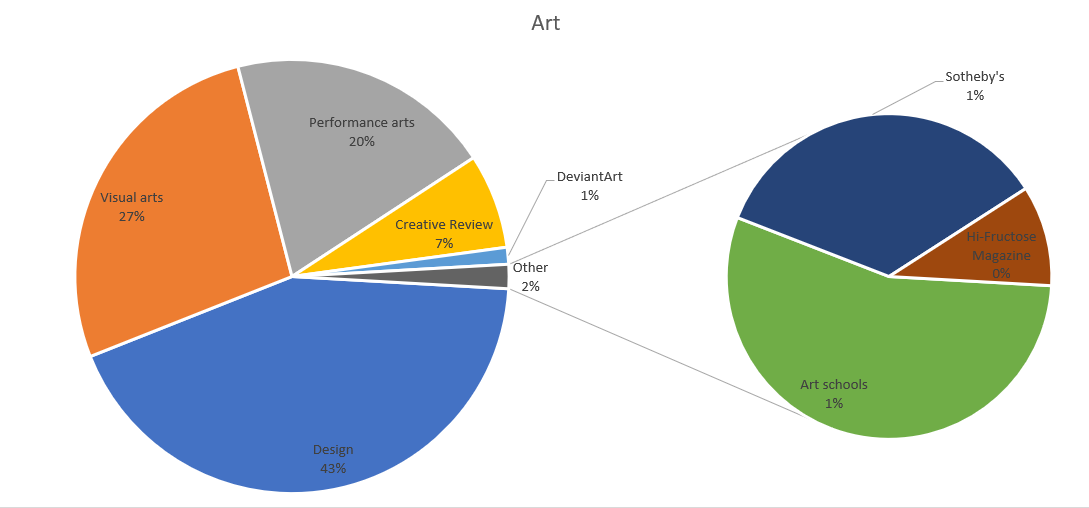
Art splits into visual and performance categories, plus a few others.
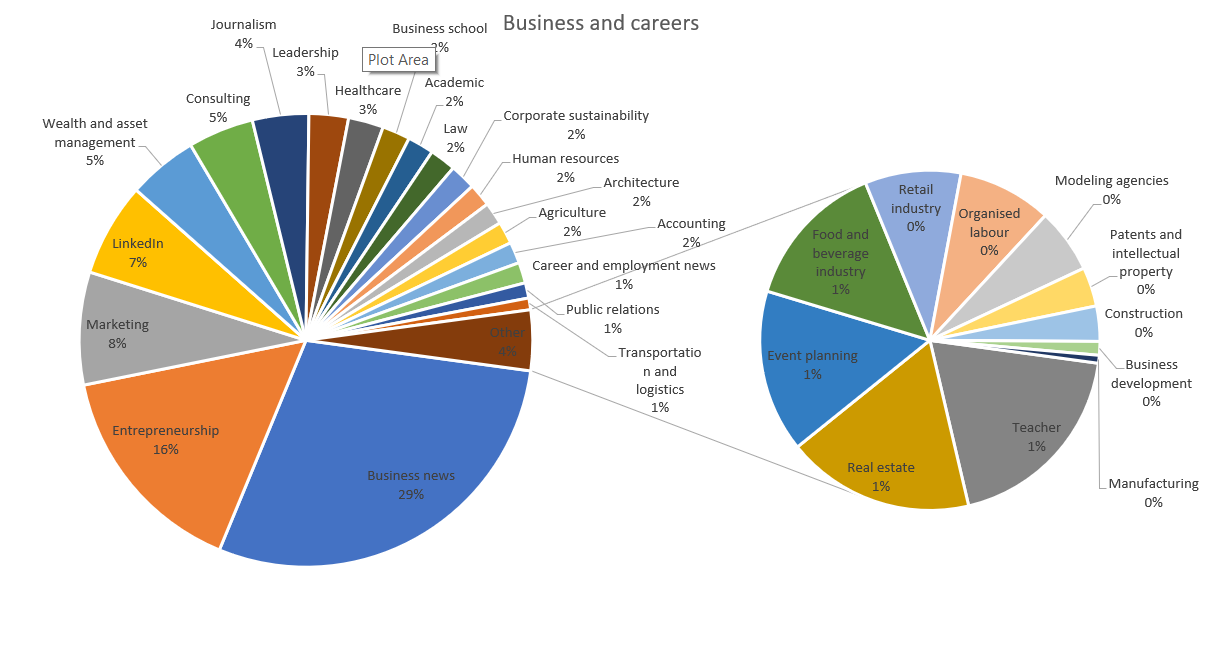
Business covers a wide range of sub-categories.
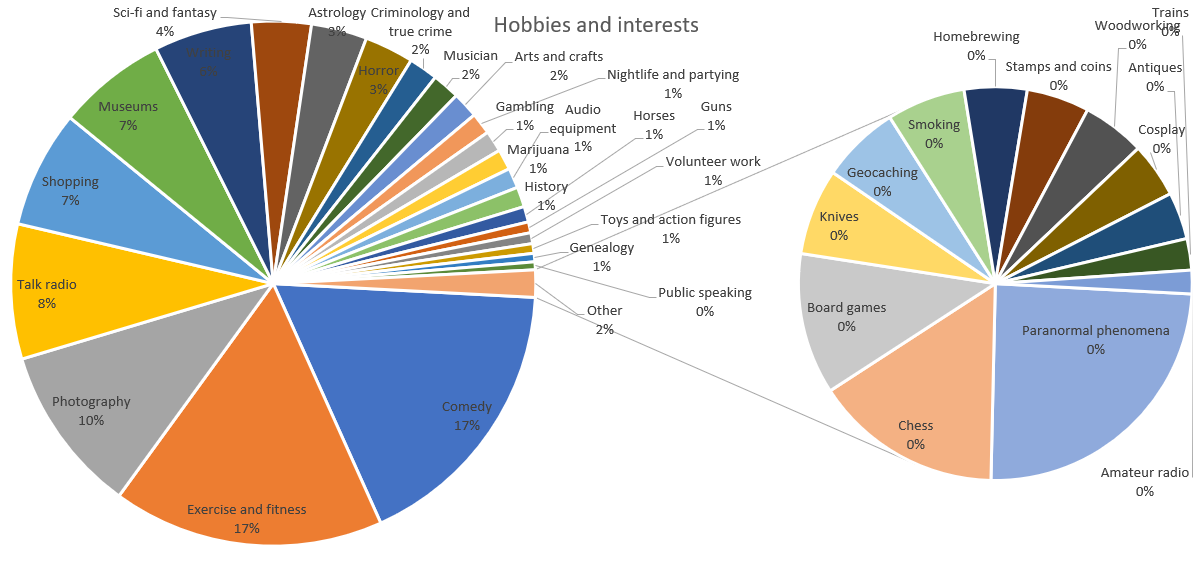
Hobbies picks up most leisure activities, though I'm still not convinced shopping counts as a hobby. 😉
What to do next
There are four concrete steps you can take right now:
- Clean the old database using list validation.
- Fix your capture processes so new data comes in clean.
- Identify every touchpoint in your business where you could be collecting email addresses.
- Enrich your list so you can segment and target properly.
Feel free to drop me an email if you want to talk through any of this.
Cheers Greg
Frequently asked questions
- What does TouchBasePro's list validation actually check?
- It checks each address for valid syntax, domain existence, and SMTP deliverability. It also flags role addresses, free email providers, disposable domains, and likely spam traps. Each address gets a quality score between 0 and 1, and the service returns spelling suggestions for common typos.
- What quality score should I use as a cut-off for marketing emails?
- For marketing email, addresses scoring 0.70 to 1.00 are considered good. Scores between 0.40 and 0.69 are fair, and anything below 0.40 is poor. For transactional email the thresholds are more relaxed: 0.55 and above is good.
- What is data enrichment and how does it help with segmentation?
- Data enrichment uses a contact's email address to pull publicly available information about their interests and online behaviour. TouchBasePro maps this to over 30 top-level topic categories, each with sub-categories, so you can segment your list and send targeted campaigns rather than blasting the same message to everyone.
- Why does targeting matter so much for email ROI?
- The widely cited 44:1 email ROI figure is not evenly spread. 77% of it comes from automated and targeted communication, not broadcast campaigns. Enriched data is what makes that targeting practical at scale.