Gmail, Yahoo and Microsoft Sender Rules: The Checklist for SA Brands
Gmail, Yahoo and Outlook now bin or block emails that can’t prove who sent them. This guide explains SPF, DKIM and DMARC in plain English, shows what each provider requires, and walks South African brands through setup, from finding who controls your .co.za DNS to moving DMARC from p=none to p=reject. It ends with a checklist you can hand straight to your IT team.

If your emails can't prove who sent them, Gmail, Yahoo and Outlook won't deliver them. That's not a future threat. It's how inboxes work in 2026.
Google and Yahoo started enforcing new sender rules in 2024. Microsoft followed in May 2025, and Outlook now rejects email from large senders that fail its checks.
All three providers ask for the same three things: SPF, DKIM and DMARC. Most South African marketers have heard the acronyms. Far fewer can say for sure whether all three are set up correctly for every tool that sends email for their brand.
That gap costs money. A campaign that fails authentication doesn't bounce politely with an error you notice. It lands in spam, or gets blocked, and your open rate quietly drops.
This guide explains, in plain English:
- What SPF, DKIM and DMARC do, and how they work together
- Exactly what Gmail, Yahoo and Microsoft require
- How to set up each one, step by step
- The South African details most guides skip
At a glance: three checks, one verdict
SPF and DKIM each check part of the story. DMARC reads both results and makes the call.
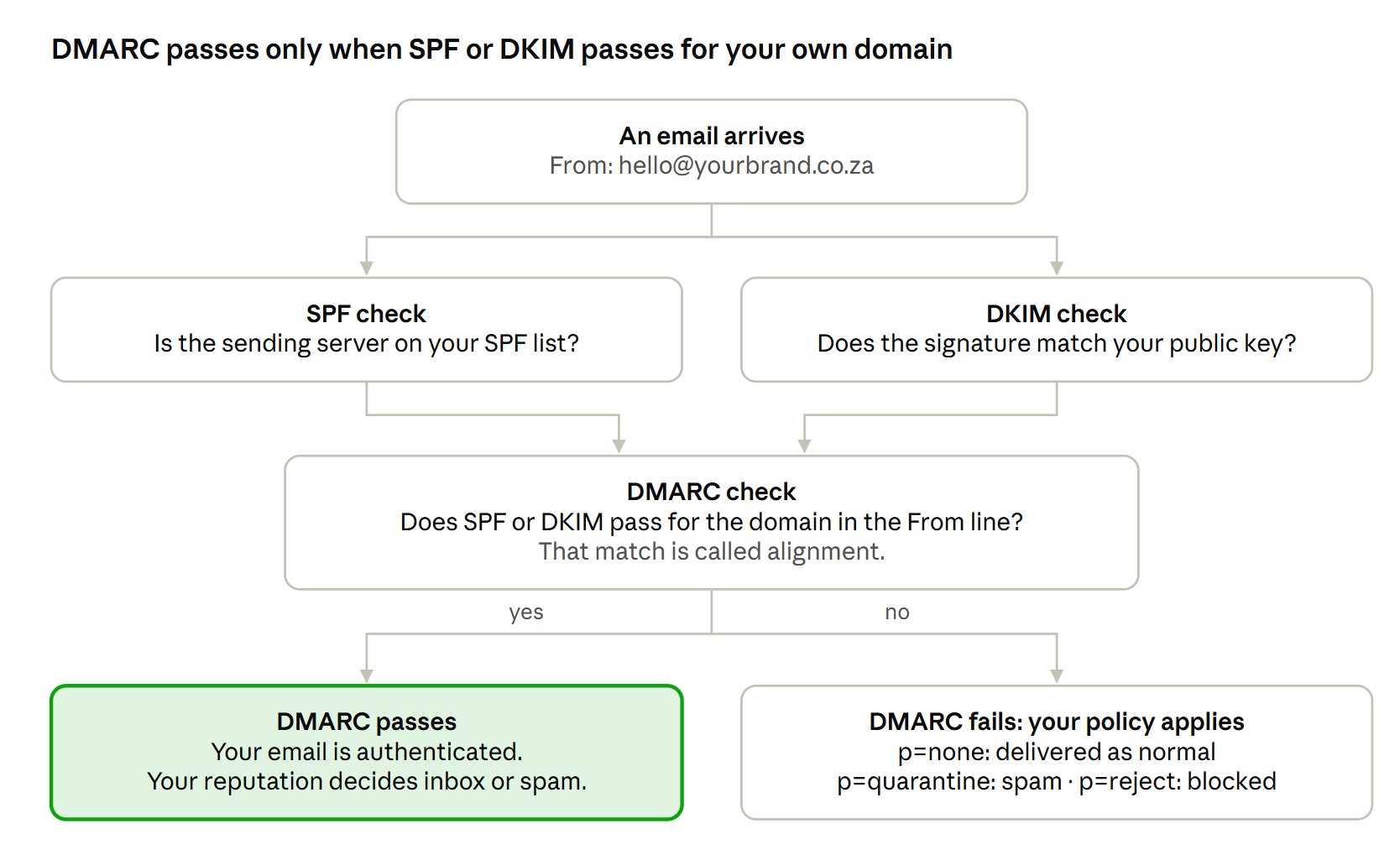
Only one of SPF or DKIM needs to pass and align for DMARC to pass. Set up both anyway. If forwarding breaks SPF, DKIM still carries you through.
What Gmail, Yahoo and Microsoft require
The rules hit hardest once you send about 5,000 or more emails a day to one provider's users. Below that, you still need the basics, and staying under the line won't protect you for long. Most growing brands cross it during a single big campaign.
| Requirement | Gmail | Yahoo | Outlook (Hotmail, Live, Outlook.com) |
|---|---|---|---|
| Applies to | All senders, stricter at 5,000+ a day | All senders, stricter for bulk senders | Senders of 5,000+ a day |
| SPF | Required | Required | Required |
| DKIM | Required | Required | Required |
| DMARC | Required for bulk senders, p=none is enough | Required for bulk senders, p=none is enough | Required, p=none is enough |
| Alignment with your From domain | SPF or DKIM must align | SPF or DKIM must align | SPF or DKIM must align, ideally both |
| One-click unsubscribe | Required on marketing email, honour within 2 days | Required on marketing email, honour within 2 days | Clear, working unsubscribe expected |
| Spam complaint rate | Below 0.3%, aim for 0.1% | Below 0.3% | Not published, hygiene expected |
| What happens if you fail | Delayed, sent to spam or rejected | Sent to spam or rejected | Rejected with error 550 5.7.515 |
Two takeaways:
- The three rules overlap almost completely. Meet Gmail's bulk sender rules, and you meet the other two.
- p=none gets you through the door, but it doesn't protect you. It tells providers you have a DMARC policy without asking them to do anything. More on that below.
SPF: the guest list
SPF (Sender Policy Framework) is a guest list for your domain. It names every server allowed to send email on your behalf. When an email arrives, the receiving server checks whether the sender is on the list.
In plain English: "Google and our email platform may send for us. Treat anyone else with suspicion."
SPF setup checklist
- List every tool that sends email using your domain: your mailbox provider, your email marketing platform, your CRM, invoicing software, helpdesk and website forms.
- Add each one's include value to a single SPF record. Your providers publish the exact value in their help docs.
- Keep only one SPF record per domain or subdomain. Two records break SPF completely.
- End with ~all (soft fail) or -all (hard fail). Never use +all, which lets anyone send as you.
Watch the 10-lookup limit
SPF allows a maximum of 10 DNS lookups. Every include counts, and some includes contain more includes. Add enough tools and your record silently fails.
The fix: remove tools you no longer use, and move bulk sending to a subdomain such as mail.yourbrand.co.za with its own SPF record.
SPF's weak spot
SPF checks the hidden "envelope" sender, not the From address your subscriber sees. It also breaks when someone forwards your email. That's why SPF alone isn't enough, and why DKIM and DMARC exist.
DKIM: the wax seal
DKIM (DomainKeys Identified Mail) works like a wax seal on a letter. Your sending platform signs every email with a private key. You publish the matching public key in your DNS. The receiving server uses it to check two things:
- The email really came from your domain
- Nobody changed it on the way
Unlike SPF, a DKIM signature survives forwarding, because it travels inside the email itself.
DKIM setup checklist
- Turn on DKIM signing in every platform that sends for you. Each one generates its own key.
- Publish each key as the DNS record the platform gives you, usually a TXT or CNAME record at a name like selector._domainkey.yourbrand.co.za.
- Make sure each platform signs with your domain, not its own. If your marketing emails carry a DKIM signature for the platform's domain, DMARC can't use it.
- Use 2048-bit keys where your DNS host supports them. 1024-bit keys still work, but they're weaker.
- Rotate keys at least once a year, or whenever someone with access leaves.
You can have as many DKIM records as you need. Each tool gets its own selector, so they never clash.
DMARC: the bouncer
DMARC (Domain-based Message Authentication, Reporting and Conformance) is the bouncer at the door. It looks at the SPF and DKIM results and asks one question: does at least one of them pass for the same domain your subscriber sees in the From address?
That match is called alignment. It's the part most brands get wrong.
Say your email shows [email protected] in the From line, but DKIM signs it for yourplatform.example. DKIM passes, but it doesn't align. DMARC fails.
DMARC also tells providers what to do when an email fails, and sends you reports on who is sending as your domain.
A starter record lives at _dmarc.yourbrand.co.za and looks like this:
v=DMARC1; p=none; rua=mailto:[email protected]
The three DMARC policies
| Policy | What providers do with failing email | When to use it |
|---|---|---|
| p=none | Deliver it as normal, and send you a report | Your first 2 to 4 weeks, while you find every sender |
| p=quarantine | Send it to spam | Once your real email passes reliably |
| p=reject | Block it completely | Your goal: full protection from spoofing |
Your DMARC rollout plan
- Publish p=none with a reporting address (rua).
- Read the reports for a few weeks. They show every service sending as your domain, including ones you forgot about.
- Fix SPF and DKIM for every real sender until they pass and align.
- Move to p=quarantine. Start with pct=25 to apply it to a quarter of failing mail, then raise it.
- Move to p=reject once quarantine runs clean.
DMARC reports arrive as XML files that nobody wants to read. Use a free or paid DMARC reporting tool to turn them into a readable dashboard.
Why p=none isn't the finish line
p=none meets the Gmail, Yahoo and Microsoft requirement. But it still lets scammers send email pretending to be you. For a South African retailer, bank or insurer, that's a phishing campaign waiting to happen. p=reject shuts it down.
Beyond the big three
Authentication gets you through the door. These rules decide whether you stay welcome.
- One-click unsubscribe. Marketing emails need a List-Unsubscribe header that supports one-click opt-out, plus a visible unsubscribe link in the email. Process every request within two days. Most email platforms add the header for you, so check that yours does.
- Spam complaint rate. Keep complaints below 0.3%, and aim for under 0.1%. Track it in Google Postmaster Tools, which is free.
- Reverse DNS. The servers sending your email need valid forward and reverse DNS records. Your email platform handles this for shared servers. Check it if you run your own mail server.
- TLS encryption. Gmail expects email to travel over an encrypted (TLS) connection. Modern platforms do this by default.
- Honest formatting. Don't fake headers, impersonate Gmail addresses in your From line or hide who you are.
Bonus: BIMI
Once you reach p=quarantine or p=reject, you can add BIMI (Brand Indicators for Message Identification). It shows your logo next to your emails in supported inboxes, including Gmail and Yahoo. Gmail requires a paid certificate for the logo to appear, so treat BIMI as a brand-trust upgrade, not a must-have.
The South African angle
The rules come from US tech giants, but South African brands trip over them in local ways.
Find out who controls your DNS
Many .co.za domains were registered years ago by a web agency, a former IT contractor or a local hosting company. Before you change anything, find out:
- Where your domain's DNS is hosted
- Who has the login
- Whether your hosting control panel already created a default SPF record
That last one matters. Many hosting panels add an SPF record automatically. Add a second one for your email platform and you now have two, which breaks SPF for everything.
Count your senders
A typical South African business sends email from far more places than it realises:
- Microsoft 365 or Google Workspace for staff mailboxes
- An email marketing platform for campaigns
- Accounting software for invoices and statements
- An online store for order confirmations
- A CRM or helpdesk for sales and support
- Payroll or HR software for payslips
Every one of these needs to pass SPF or DKIM, and align with your domain. Miss one and its emails fail DMARC, which hurts most when you move to p=reject, and your invoices stop arriving.
Split your traffic with subdomains
Send marketing from a subdomain such as news.yourbrand.co.za and transactional email from another, such as notify.yourbrand.co.za. Each gets its own reputation. A complaint spike on a promo campaign then can't drag down a customer's payslip or account statement.
Authentication supports compliance
SPF, DKIM and DMARC don't make you POPIA or NCC compliant on their own. They do help:
- POPIA requires you to protect personal information with reasonable security measures. DMARC at p=reject stops criminals from sending phishing emails in your name to your own customers.
- The NCC Opt-Out Registry requires every marketing message to identify the sender clearly. Authentication proves technically that the email came from you. Your content still needs your business name, address and contact details.
Seven mistakes that break authentication
| Mistake | What happens | The fix |
|---|---|---|
| Two SPF records on one domain | SPF fails for every sender | Merge them into one record |
| More than 10 SPF lookups | SPF fails without warning | Remove old tools, move bulk sending to a subdomain |
| DKIM signed with the platform's domain | DKIM passes but DMARC fails | Set up custom DKIM for your own domain |
| Sending from a free address such as @gmail.com | Gmail's DMARC policy blocks it | Always send from your own domain |
| Jumping straight to p=reject | Legitimate email (invoices, payslips) gets blocked | Start at p=none and read the reports |
| Setting up DMARC and never reading reports | You miss new senders and spoofing attempts | Use a DMARC reporting tool and check it monthly |
| Forgetting old tools | A tool you stopped paying for still sits in your SPF record, or a new one never got added | |
The SPF, DKIM and DMARC checklist
Hand this to your IT team or email platform and tick it off together.
Before you start
- Confirm who controls your domain's DNS and get access
- List every tool that sends email using your domain
SPF
- One SPF record per domain or subdomain
- Every legitimate sender included
- 10 DNS lookups or fewer
- Ends in ~all or -all, never +all
DKIM
- DKIM turned on in every sending platform
- Each platform signs with your domain, not its own
- 2048-bit keys where supported, rotated yearly
DMARC
- DMARC record published at _dmarc.yourdomain.co.za
- Reporting address (rua) added and a reporting tool connected
- SPF or DKIM aligned for every sender
- Plan agreed to move from p=none to p=quarantine to p=reject
Sending hygiene
- One-click unsubscribe header on all marketing email
- Unsubscribes processed within two days
- Google Postmaster Tools set up and spam rate below 0.3%
- Marketing and transactional email on separate subdomains
Get it right once, then forget about it
Authentication sounds technical, but it's a one-off job with a small upkeep. Set it up properly, check your reports and audit your senders twice a year. Your emails reach the inbox, and scammers can't hijack your brand.
Not sure where your domain stands? TouchBasePro's team helps South African brands set up and check SPF, DKIM and DMARC as part of onboarding. Talk to us and we'll help you find the gaps before Gmail does.